Email headers are the technical fingerprint attached to every message you send or receive — and unlike the subject line or body text, they're written by mail servers, not people, which makes them far harder to fake convincingly. Here's how to view them and what the most important fields actually mean.
Step 1: View the raw source
Every major email client has a way to show the full source instead of the rendered message:
- Gmail: open the message, click the three-dot menu, select "Show original."
- Outlook (desktop): open the message, go to File → Properties, and look at "Internet headers."
- Outlook (web): open the message, click the three-dot menu, select "View" → "View message source."
- Apple Mail: open the message, go to View → Message → All Headers.
What you'll see is a block of plain text — dense at first glance, but structured in a predictable order once you know what to look for.
Step 2: Read the Received chain from the bottom up
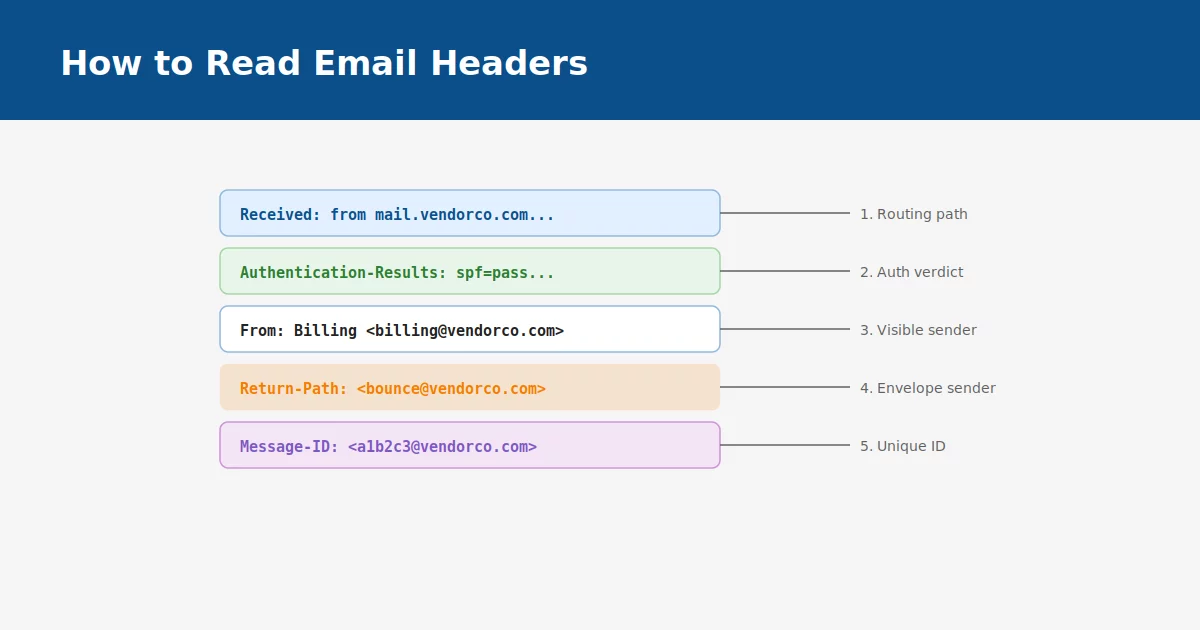
Each server that handles a message adds its own Received: line, stamped on top of the previous ones. That means the header at the very bottom of the block was written first — it's the closest thing to the message's actual origin. Reading from bottom to top reconstructs the real delivery path, hop by hop, which is often very different from what the visible sender address suggests.
Step 3: Check the Authentication-Results header
This is usually the single most useful line in the entire header block. It shows the verdict a receiving server reached for three separate checks:
- spf=pass or spf=fail — was the sending server authorized for this domain?
- dkim=pass or dkim=fail — was the message signed, and does the signature still match?
- dmarc=pass or dmarc=fail — do the above two actually align with the visible From: address?
A message can technically pass SPF and DKIM while still failing DMARC, if the authenticated domain doesn't match what's displayed to the reader. That mismatch is one of the clearest signs of a spoofed or lookalike sender.
Step 4: Compare the From: header to the Return-Path
The From: header is what a reader sees. The Return-Path (sometimes labeled envelope-from) is where bounce notifications actually go — and it's set by the sending infrastructure, not chosen for display. When these two point to completely unrelated domains, it's worth a second look before trusting anything in the message.
Step 5: Note the Message-ID format
Legitimate mail systems generate a Message-ID in a predictable, domain-consistent format. It's a small detail, but spoofing tools frequently get it wrong or leave it out entirely — making it a useful, if minor, corroborating signal alongside everything else.
Putting it together
No single header field proves a message is safe or malicious on its own. The pattern across all of them — routing path, authentication verdict, and the relationship between the visible and technical sender — is what tells the real story. Once you've read a few dozen headers, spotting the ones that don't fit the pattern becomes almost immediate.